Issue Invoice

Merchant Accounting makes it easy to create sales, purchase, and other types of invoices. Follow the steps below to select the invoice type, add products or services, enter quantity, price and other information, and finally save your invoice.

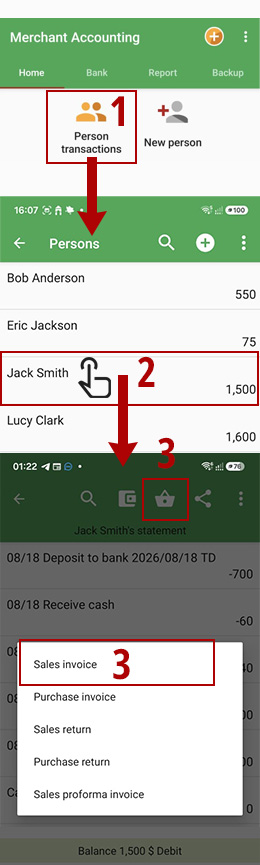
  1. Select "Person transactions".
  2. Select the desired person.
  3. Invoice Select "Invoice", then select "Sales Invoice".
issue invoice
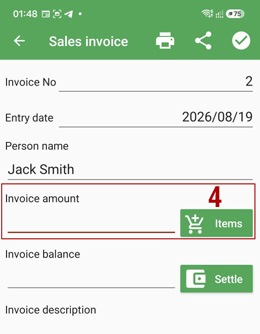
  1. Set the invoice total by selecting items, or you can alternatively enter the total amount manually.
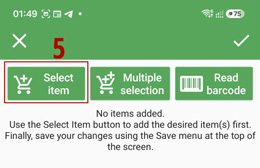
  2. Tap the "Select item" button.
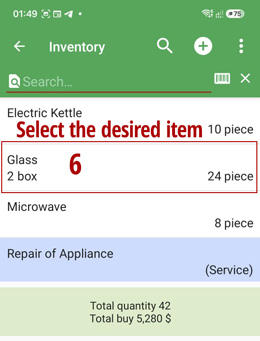
  3. Select the desired product.
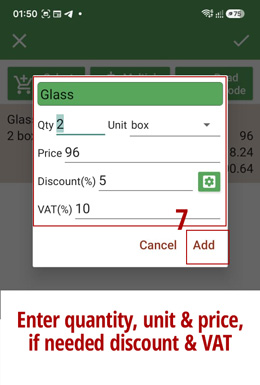
  4. Enter the quantity and price, then tap the "Add" button.
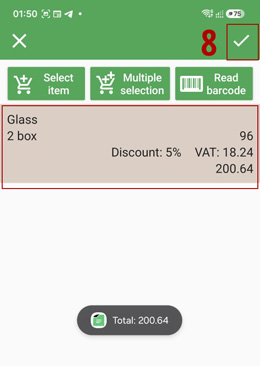
  5. The product will be added to the invoice items. If needed, add more products. When finished, tap the "Save" button.
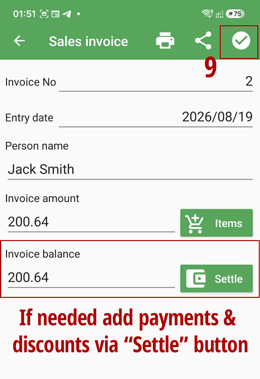
  6. If needed, use the "Settle" button to record payments and discounts. Finally, tap the "Save" button to save the invoice.
set invoice total
select item
products and services
enter quantity and price
invoice items
store invoice