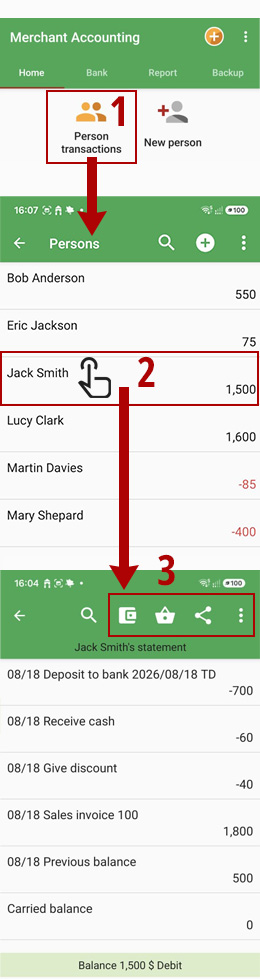
After selecting "Person transactions", you will see a list of persons along with their account balances.
Negative amounts indicate that the person is owed money by you (credit balance),
while positive amounts indicate that the person owes you money (debit balance).
For example, in the screenshots, Mr. John Smith must pay you
$1500, while you must pay $400 to Mrs. Mary Shepard.
Select the desired person to view his/her account details.
To add a new transaction
(invoice, discount, receipt/payment),
use the options at the top of the page:
Receipts & Payments: Cash or bank transfer
Issue Invoice: Purchase, sales, and return invoices
Export and share the statement as PDF, HTML/Excel, or text
 Receipts & Payments: Cash or bank transfer
 Issue Invoice: Purchase, sales, and return invoices
 Export and share the statement as PDF, HTML/Excel, or text
 Other operations, such as discounts